MeshEdit STUDIO

About MeshEdit

Model, rig and animate 3D game assets in your browser.

MeshEdit is a free, agent-native 3D studio for game assets: characters, creatures, props and scenery for real-time games and Three.js scenes. You shape them, rig them and animate them right in your browser, alone or with an AI agent working alongside you.

Open MeshEditQuestions and answers

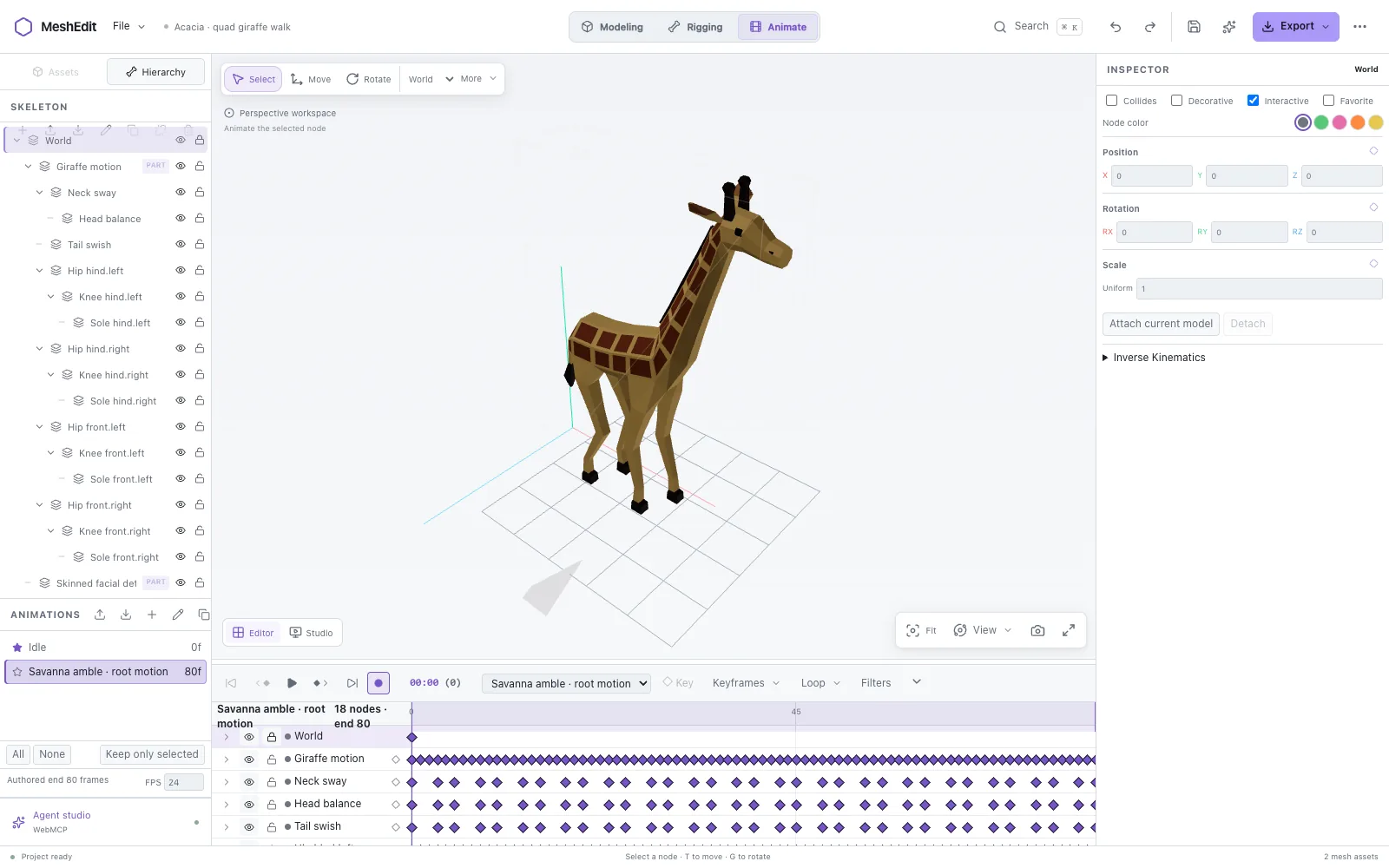
The MeshEdit editor in the Animate workspace: a low-poly giraffe stands in the 3D viewport, its skeleton is listed on the left, and its walk clip runs along the keyframe timeline below.
The Animate workspace: a rigged low-poly giraffe with its skeleton and a walk clip on the keyframe timeline.

What MeshEdit is

MeshEdit is a browser-based editor for polygon modeling, rigging and animation. It runs entirely in your browser, so there is nothing to install and no account to create. It opens Blender, GLB, glTF and OBJ files and exports optimized GLB files that are ready for Three.js and game engines.

It is agent-native: an AI agent can model, rig, animate, review and export in the same document you have open. Human and agent edits go through the same validated steps and share one undo history.

What you can do with it

Model

Select vertices, edges and faces and transform them precisely. Start from a primitive or a drawn low-poly silhouette, then extrude, inset, bevel, cut loops and mirror. Build forms with lofts, lathes and sweeps, combine solids with Boolean union, difference and intersection, and stack editable mirror, array, solidify and subdivision modifiers that keep their base geometry.

Materials and UVs

Per-face PBR materials, saved UV seams, seam-aware unwrapping with overlap and fold checks, UV island packing, and baked base color, normal, ORM and emission maps.

Rig

Object hierarchies, reusable parts, skin binding with up to four influences per vertex, region weights and IK posing.

Animate

Clips with keyframes, easing and exact STEP holds, procedural gait, look and oscillation motion, and motion reviews. Deliver an animated GLB or an MP4 video, including a camera turntable.

Import

Blender .blend files open directly in the browser, without Blender. GLB and glTF keep their hierarchy and supported animation, and OBJ meshes and MeshEdit projects open too.

Export

GLB with models and animation, meshopt-compressed GLB, glTF, OBJ and MP4 video, or the editable MeshEdit project. Asset checks report triangle counts against a budget, and derived LODs keep distant models light.

How to use it

  1. Open meshedit.xyz in a current browser with WebGL 2.
  2. Choose Create project to start a new mesh, or Open an asset to bring in a .blend, GLB, glTF, OBJ or MeshEdit project file.
  3. Shape your asset in the Modeling workspace, build and pose its skeleton in Rigging, and add clips and keyframes in Animate. Press ⌘ K or Ctrl K in the editor to find any action.
  4. Use Export for a GLB, compressed GLB, glTF, OBJ or MP4 video, and Save to download an editable .meshedit.json project you can open again later.

Working with AI agents

In a browser that supports WebMCP, such as the built-in browser in Codex, MeshEdit offers its meshedit_* site tools to your agent. There is no server to install, no endpoint and no pairing token: the agent acts on the document that is open in the tab.

Every write checks the document's revision, a batch of changes is one undo step, and the agent can render multiview images to review its own work before it exports. On the start screen, Design with an agent shows the tools, ready-made examples and recent agent activity, and lets you switch agent access off for the page.

Privacy and limits

Your files are not uploaded: projects stay in your browser until you save or export them. The site counts visits without cookies.

MeshEdit is made for game assets, not as a replacement for Blender. An asset can have up to 50,000 vertices and faces, a document up to 200,000 vertices and 512 mesh assets, with four skin influences per vertex and textures up to 512 × 512. Blender files open with their saved base meshes, materials and hierarchy, and the import report lists what MeshEdit could not evaluate.

Who made MeshEdit

MeshEdit is designed and built by Ricardo de Zoete, also known as Hammy and RZDESIGN: a Design Lead, UI/UX and AI/agent designer, illustrator and creative developer from the Netherlands. It started as the mesh workflow of VoxEdit Web, his Three.js version of The Sandbox's voxel editor, and grew into an app of its own.

See more of his work at hammy.studio, or follow him on X.

Questions and answers

Is MeshEdit free?

Yes. MeshEdit is free to use in your browser, with no account and nothing to install.

Do I need Blender to open .blend files?

No. MeshEdit opens Blender .blend files directly in the browser, including compressed saves of up to 64 MiB. Blender does not need to be installed and the file is not uploaded for conversion. MeshEdit restores the saved base meshes, materials and hierarchy, and its import report lists the Blender features it could not evaluate, such as modifiers and animation.

Which file formats does MeshEdit support?

MeshEdit opens Blender .blend, GLB, glTF, OBJ and MeshEdit project (.meshedit.json) files. It exports GLB with models and animation, meshopt-compressed GLB, glTF, OBJ, MP4 video and the editable MeshEdit project.

Can I use MeshEdit models in Three.js or a game engine?

Yes. GLB is the binary form of glTF 2.0, which Three.js and most game engines and 3D tools can load. Compressed GLB files use meshopt (EXT_meshopt_compression), so the loader needs a meshopt decoder, such as MeshoptDecoder in Three.js.

How do AI agents work with MeshEdit?

Through WebMCP. In a browser that supports it, such as the built-in browser in Codex, MeshEdit offers its meshedit_* site tools to your agent. The agent works in the document you have open, its edits share your undo history, and there is no server, endpoint or pairing token to set up.

Where are my projects stored?

In your browser. MeshEdit keeps your recent projects and a recovery copy in this browser's storage while you work. Save downloads an editable .meshedit.json file, and Export writes GLB, glTF, OBJ or MP4 files, so you can keep your work anywhere.

Is MeshEdit a replacement for Blender?

No. MeshEdit is a focused tool for making game assets. It has no Geometry Nodes, cloth or fluid simulation, node material editor or path tracer, and it does not write .blend files.

Who made MeshEdit?

Ricardo de Zoete, also known as Hammy, a Design Lead, UI/UX and AI/agent designer, illustrator and creative developer from the Netherlands. His portfolio is hammy.studio.
Open MeshEdit